Splitwise made "split the bill in an app" a mainstream idea, and for many groups it's still the default answer. But defaults deserve re-examination, and if you're reading this you've probably hit a wall — a paywalled feature, a ledger per group that doesn't fit how you actually share money, or simply the feeling that tracking a dinner shouldn't require this many taps.
Updated October 2026.
Below is a side-by-side table of the most common alternatives, then the seven questions that actually separate expense-splitting tools, and how to think about each one. Full disclosure: we build HiBill, one of the alternatives, and this article explains the trade-offs we chose — but the questions apply to any tool you evaluate.
Splitwise alternatives compared
App | Free expense limit | Ads on free | Receipt scanning on free | Multiple currencies | Web app | Paid plan |
|---|---|---|---|---|---|---|
Splitwise | 4 expenses a day | Yes | No (Pro) | Yes; converting is Pro | Yes | Pro, $4.99/month or $39.99/year |
Tricount | None | No | No (photos only) | Yes, converted at market rate | No (iOS, Android) | None, free |
Settle Up | None | Yes | No | Yes, live rates | Yes | Premium, $3.99/month or $19.99/year |
Splid | None (extra groups are paid) | No | No | Yes, 150+ | No (iOS, Android) | Splid Plus, $3.99 once |
Spliit | None | No | Yes | Yes, rate per expense | Yes | None, free and open source |
Kittysplit | None (up to 9 people per group) | No | No | Paid upgrade only | Yes, no account needed | Super Kitty, €2.99 once per group |
HiBill | None | No | Yes, 5 a month | Yes, 38, kept per currency | Yes | Pro, $4.99/month |
Checked on October 6, 2026 against each app's own website, help center and app store listing. Prices are US App Store prices where the vendor doesn't publish one, and vary by country. A few things worth knowing beyond the table:
Splitwise caps free users at 4 new expenses a day, according to its help center; Pro removes the cap and the ads, and adds receipt scanning and currency conversion.
Tricount is free with no limits, but since its relaunch it is phone-only, and CSV and PDF export and custom categories were dropped along with its Premium plan.
Spliit is open source: you can use the free hosted version or run your own.
Kittysplit needs no account at all, which suits a one-off trip.
Splid works offline, handy when you travel without data.
1. Where do balances live — in groups, or between people?
This is the deepest structural difference between tools, and most people never think about it until it bites.
Group-ledger apps keep a separate balance inside every group: a "Trip to Rome" group, a "Flat 4B" group, and a separate sub-balance with the same friend in each. The upside is tidy containers. The downside appears when reality doesn't fit containers: you and Sam share a flat and went on the trip and have a running coffee tab. Now your relationship with one human is scattered across three group ledgers, and "how do we stand overall?" requires arithmetic.
Person-first apps keep one balance per human, regardless of context. Every dinner, deposit, and repayment between you and Sam lands on the same two-person ledger. HiBill takes this approach. It still has groups — a trip or a flat joins through one link or QR code, and the trip's expenses stay together on the group's page — but a group holds no balance of its own, so money always settles person to person.
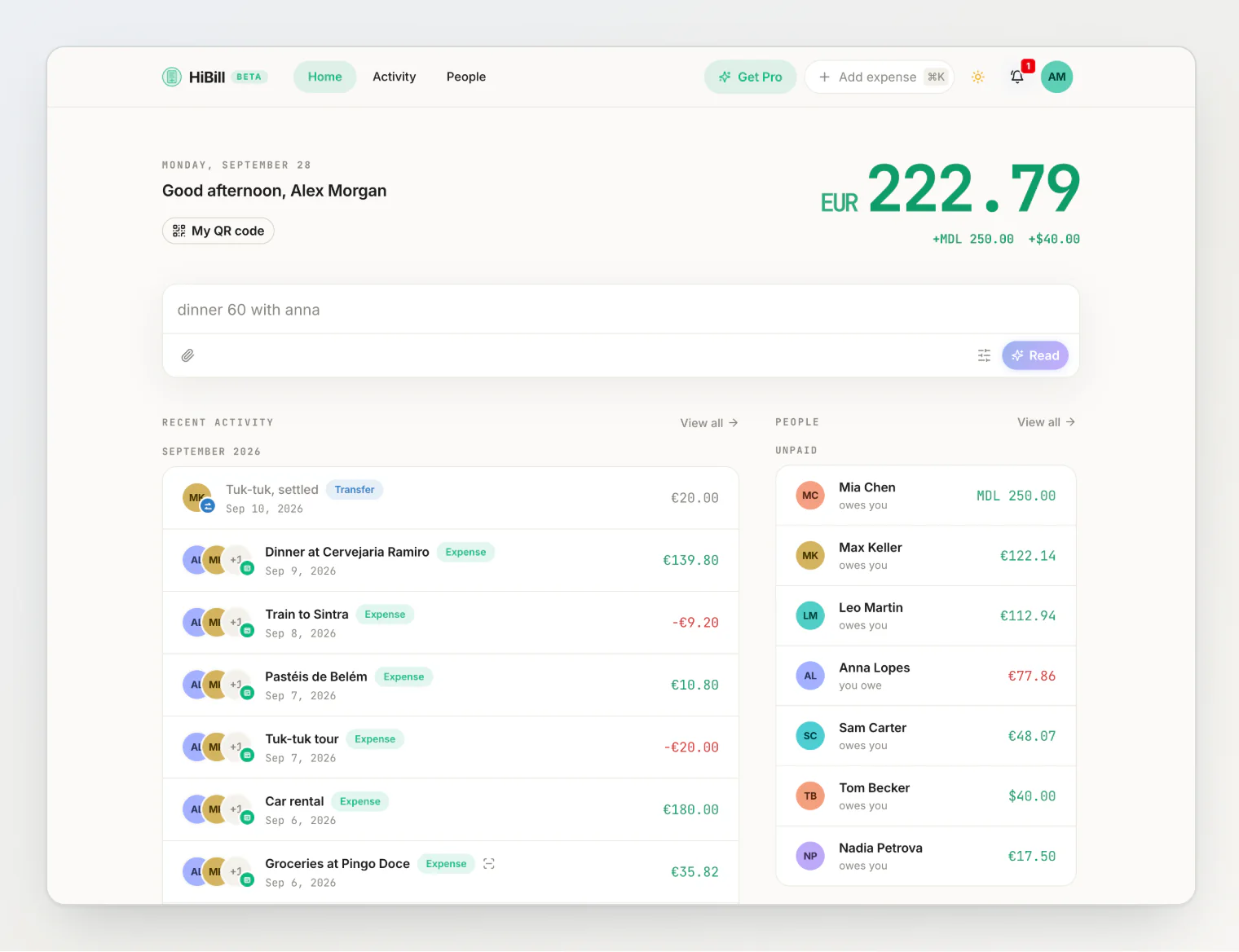
Neither model is universally right. If your sharing life is neatly compartmentalized, a ledger per group is fine. If the same people recur across contexts — which describes most friendships — per-person balances answer the question you actually have.
2. How are settlements handled?
When someone pays you back, what happens in the app? In some tools, settling up is a separate mode or a special action distinct from ordinary expenses. That separation sounds harmless, but it means the timeline of your shared money is split across places, and cash repayments ("here's forty for my share") can be awkward to represent.
The alternative is to treat a repayment as a first-class entry: a transfer, sitting in the same chronological timeline as the expenses it resolves. You can scroll one history and see the complete story — who paid for what, who paid whom back, in order. This is the model HiBill uses: two kinds of entry, expenses and transfers, one timeline, one balance.
Ask of any candidate app: can I log a cash repayment in two taps, and will I see it inline with everything else?
3. How flexible are splits — and how fast is the common case?
Every app splits evenly. The differences show up at the edges:
Exact amounts and percentages for genuinely uneven shares.
Split by items for restaurant bills where people had very different meals, ideally with a sane rule for tax and tip (proportional to items, or equal).
Multiple payers on one expense, for when two people covered a bill together.
Receipt capture. Typing a fifteen-line receipt is where diligent tracking goes to die. Some tools, HiBill included, will read a photographed receipt — total, date, currency, line items — and show it to you for review before anything is saved.
Claim-your-share links. For big shared bills, being able to send one link and let each person mark the items they had beats interrogating the table.
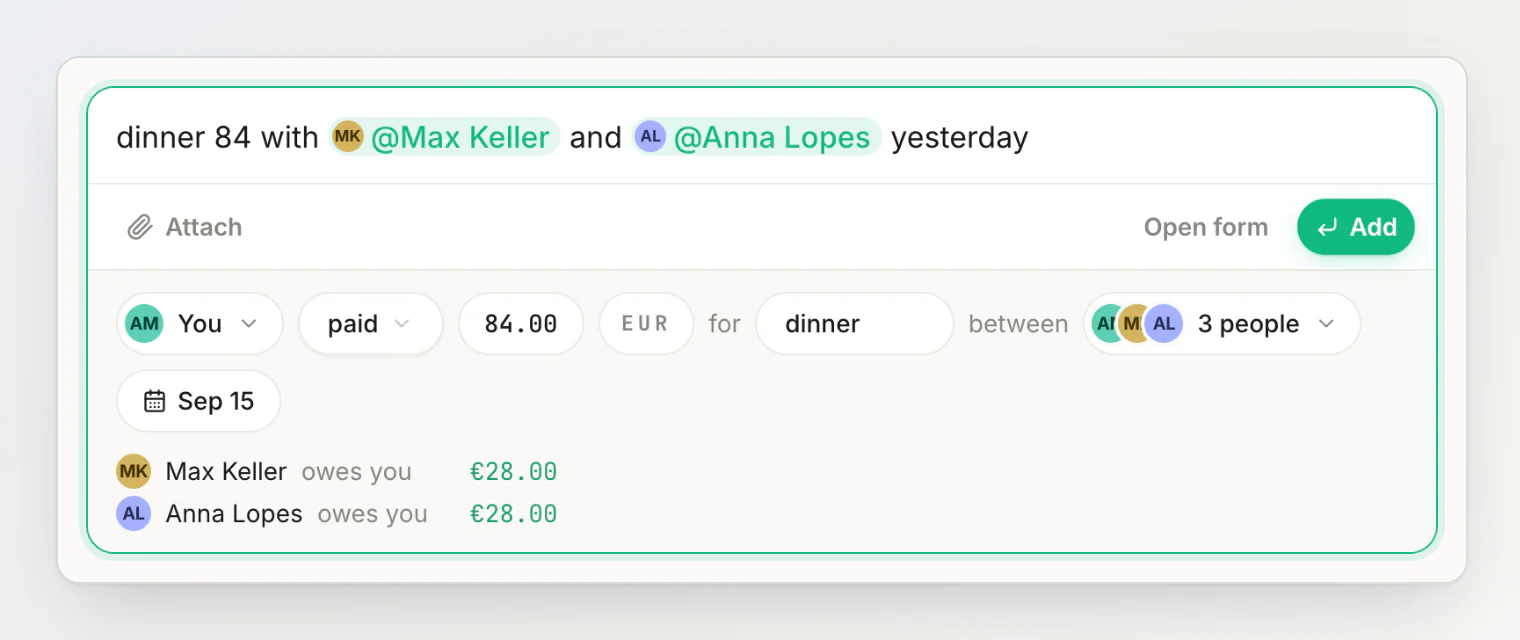
The flip side matters equally: the common case (even split, three people, done) should be nearly instantaneous. An app optimized for exotic splits but slow at "dinner, split three ways" will lose to a notes app in practice. In HiBill the common case is one typed sentence: AI reads it, and you check the review before adding it.
4. What happens with people who won't install the app?
Every group has one. A good tool lets you add someone as a placeholder — a name you track against — and record faithfully whether or not they ever sign up. Better tools let a placeholder be merged into a real account later, with the person's approval, so the history carries over. Check for this; it determines whether the app can be your system or must be everyone's system to work at all.
5. Multi-currency support
If you travel with the people you split with, currency handling stops being a footnote. Look for: recording expenses in the currency actually paid, per-currency balances (owing €40 and being owed £15 are different facts, not one converted number), and a wide currency list. HiBill supports USD, EUR, GBP and about 35 more, and detects the currency from scanned receipts.
6. What does the free tier actually let you do?
Pricing structures vary widely: per-feature paywalls, subscription-only, ad-supported. The questions that matter:
Are core actions — adding expenses, splitting, settling — unlimited for free, or capped?
Does the paid tier gate convenience (more receipt scans, more storage) or capability (basic split types)?
Is pricing per person, or does one subscription cover your whole sharing life?
HiBill's answer, for reference: the free tier is free forever, with unlimited transactions, caps on placeholders and groups set far above everyday use (2,000 placeholders, 200 groups), and monthly AI receipt scans, AI sentence reads and storage as the metered extras; Pro raises those limits for one flat monthly price, with no per-seat math. Compare that with the table above: Splitwise's free plan stops at 4 expenses a day, and several apps keep receipt scanning or currency conversion for paying users.
7. Does it require a bank connection?
Some expense tools want to link your bank account and import transactions. That's powerful for solo budgeting, but for shared expenses it's usually the wrong layer — the bank knows you paid €87 at a restaurant; it doesn't know five people shared it. A deliberate, manual record of shared money can be more accurate than an automatic record of all money. HiBill takes the no-bank-connection position: you tell it what happened, it remembers. If automatic import is what you want, you want a different category of tool.
Choosing
Rank the questions by your own pain. Scattered balances with recurring people → prioritize one balance per person. Dying receipts → prioritize scanning. International friend group → currencies. Hitting Splitwise's daily limit → any app in the table without one. Then trial the top candidate on one real shared expense with one real friend — a week of actual use reveals more than any comparison table, including this one.
Continue reading
How HiBill Works: A Quiet Ledger for the Money Between Friends — the person-first model in one read: one timeline, per-person balances, groups that hold no money.
HiBill Free vs Pro: What You Get, What's Metered, and When to Upgrade — the exact limits behind question 6, and when Pro is worth it.
How to Split Expenses with Someone Who Isn't on the App — how placeholders work, and how balances merge when someone joins later.