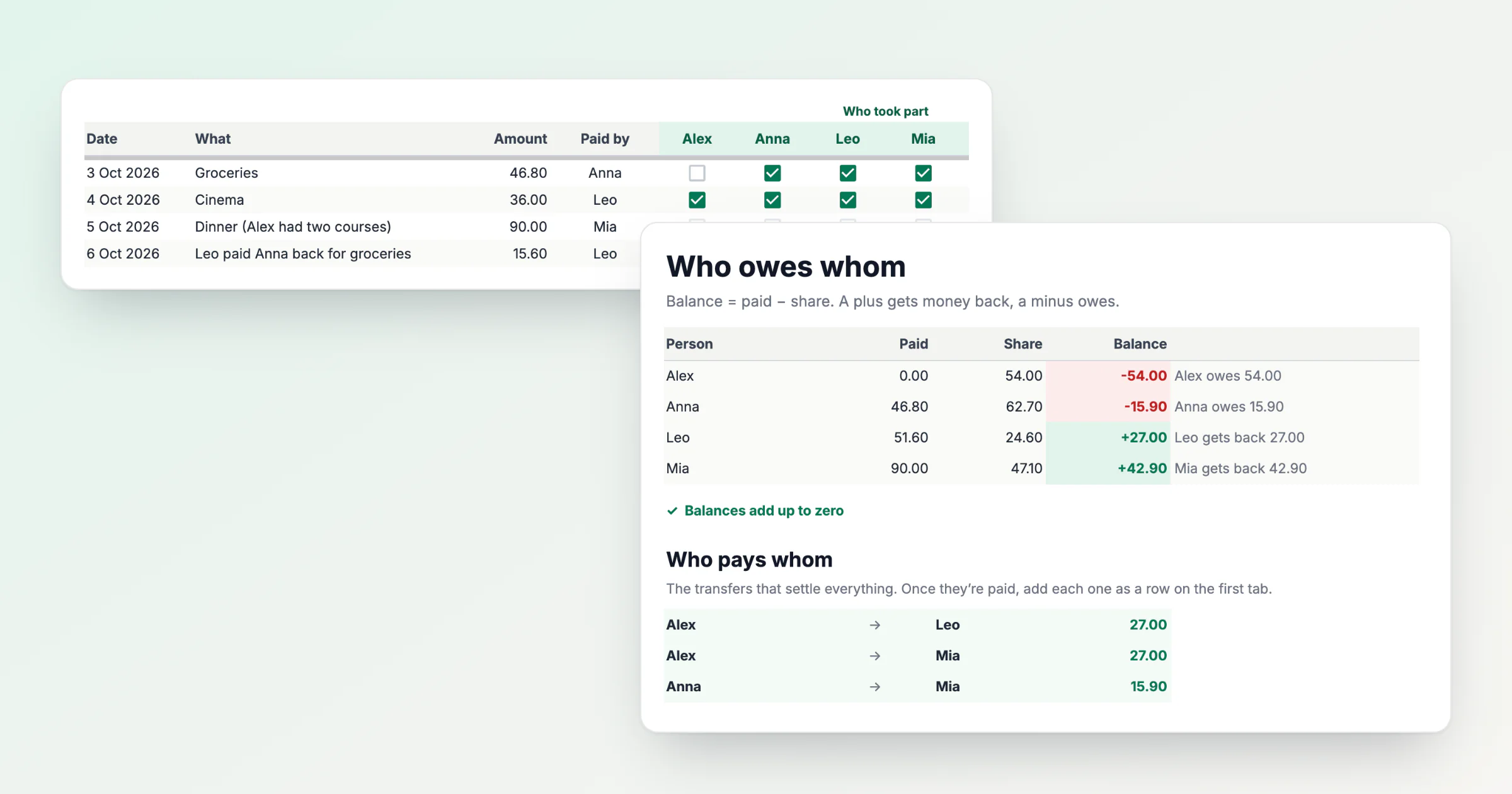
Shared Expenses Spreadsheet: A Free Google Sheets Template
A free Google Sheets template for shared expenses: tick who took part, and it works out each person's balance and who pays whom. And the five things that break it.
Ideas, tutorials, and updates from our team.
A free Google Sheets template for shared expenses: tick who took part, and it works out each person's balance and who pays whom. And the five things that break it.
Nine steps to splitting shared costs with friends: decide who took part, pick the split, keep one running balance, and record repayments and currencies as you go.
One formula answers who owes whom after any shared spending: amount paid minus personal share. Worked examples for a night out, unequal splits, repayments and a weekend trip.
Itemizing a bill is the fairest way to split it and the most tedious. Now you can write what you had in one sentence and let the receipt divide itself — on your side and theirs.
You remember the taxi from the airport, not the day it happened. Searching a whole history is the wrong tool for that: the expense you want is already on a group's page or a person's page, and both now have a search box.
Most shared expenses go unrecorded because the form is slower than the moment. An AI expense splitter lets you type what happened in your own words and shows you what it understood before anything is saved. Here is how it works, what to check, and when to use the form instead.
Type what happened in your own words, press Read and check what HiBill understood before you add it. Twenty example sentences, what the review shows for each, and what happens when one is missing something.
Most shared expenses never get recorded. Not because anyone forgets, but because a seven-field form is slower than the moment allows. Type the sentence you would have texted instead.
The amount was right but the date was wrong, or the receipt never got attached. How to correct a shared expense after saving, what your friends see when you do, and when to comment instead of edit.
A detail panel that lives in the URL survives a refresh, works with the Back button, and can be sent to someone. Here is how HiBill's side panel for expenses and people works, and why it isn't a modal.
You don't need everyone to download an app to split expenses with them. How placeholders work, and how balances merge when someone joins later.
50/50 isn't the only fair split. Three ways couples with unequal incomes divide expenses, how to pick one, and how to track it without a spreadsheet.