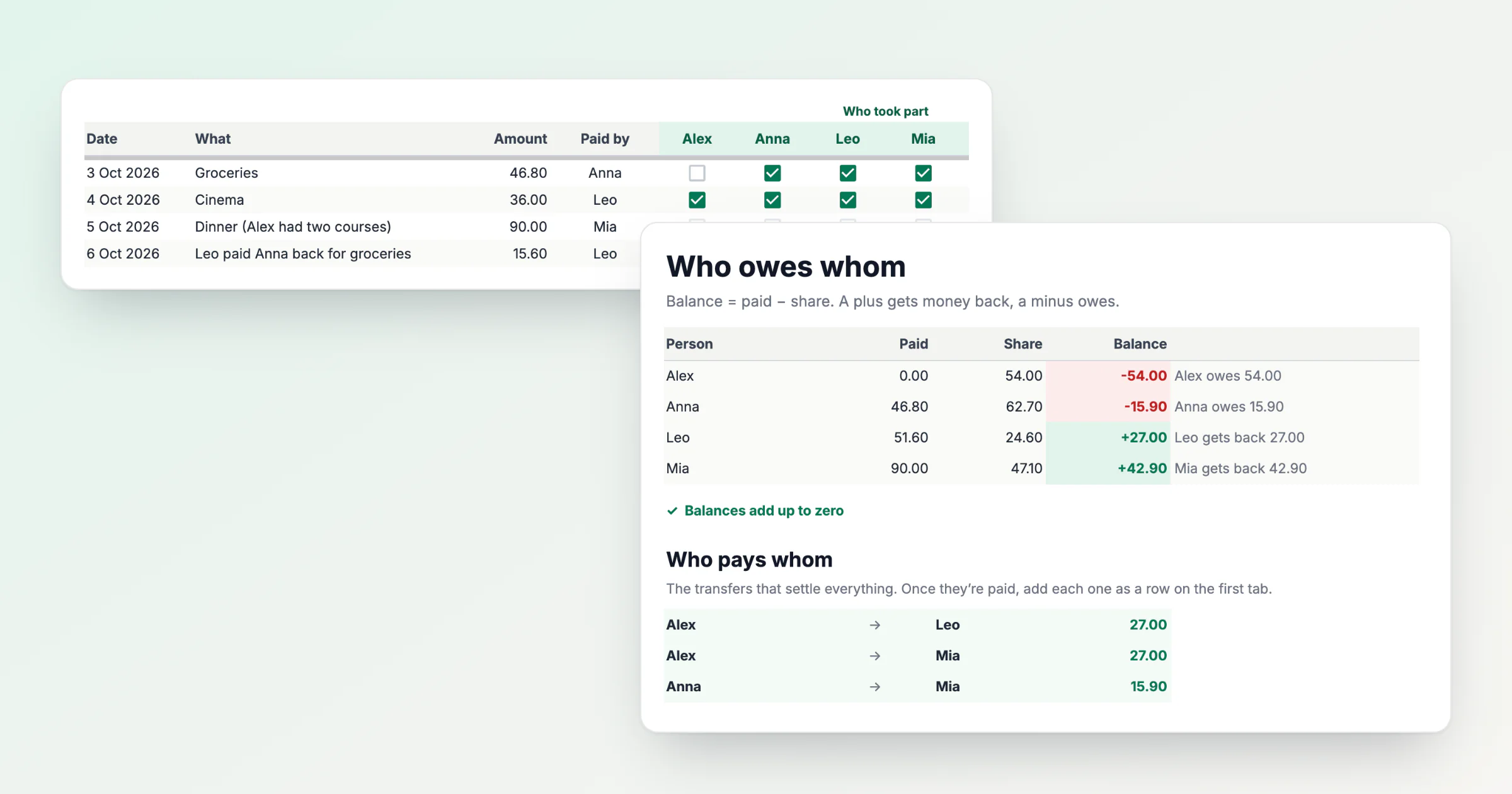
This is a free shared expenses spreadsheet: make a copy in Google Sheets. It doesn't ask for your email and doesn't need a HiBill account, only a Google one.
You add a row per expense and tick everyone who took part. The sheet works out each person's balance, what they paid minus their share, and the transfers that settle everyone. In the four example rows, Alex owes 54.00, and three transfers close the month.
Set it up for your group
Open the link and press Make a copy. The original stays read-only; the copy lands in your Google Drive. If you write the day before the month or use a decimal comma, set your locale first in File → Settings: the copy starts in United States format, where 3/10 is March 10.
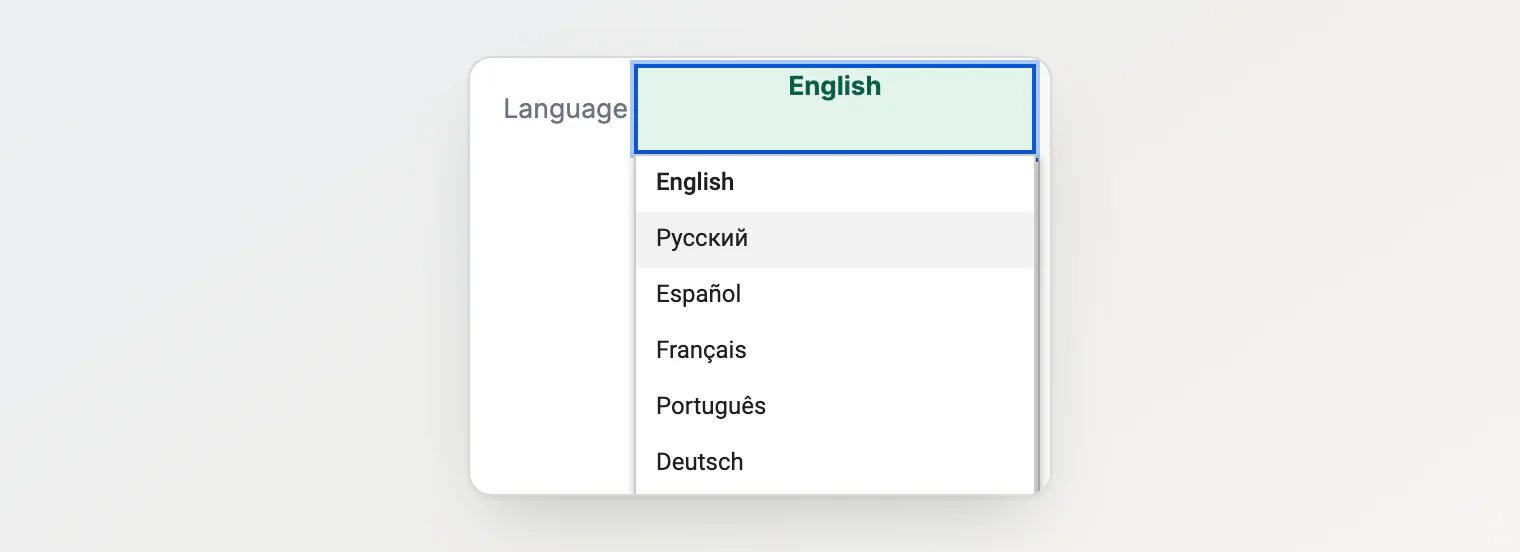
Pick a language under Language at the top of the first tab: English, Russian, Spanish, French, Portuguese or German. The labels, the checks and the balances in words switch; the tab names stay in English.
Delete the example rows: select rows 13–16 by their numbers, right-click and choose Delete rows 13 - 16. Clearing the cells instead would wipe the formulas in those rows. Then type everyone's name in the green cells, up to six people.
Share the copy with the group: Share, their emails, and Editor, so whoever pays can add the row.
For each expense, add a row: the date, what it was, the amount and who paid, picked from the names. Then tick everyone who took part. In the example, Alex skipped the groceries, so the 46.80 splits three ways, 15.60 each. Check, to the right of the ticks, flags a row that's missing something.
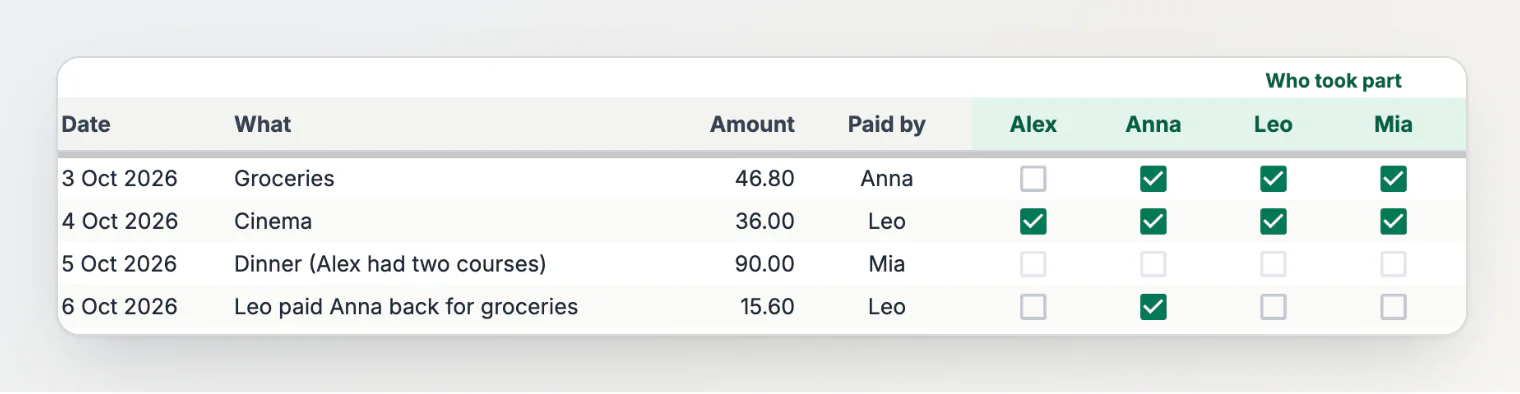
If the split isn't equal, type each person's part under Custom amounts, to the right of Check. The row's tick boxes fade, because ticks don't count there. In the example, Alex had two courses at dinner: 45.00 for Alex, 22.50 each for Anna and Mia. If the parts don't add up to the amount, Check shows what they add up to.
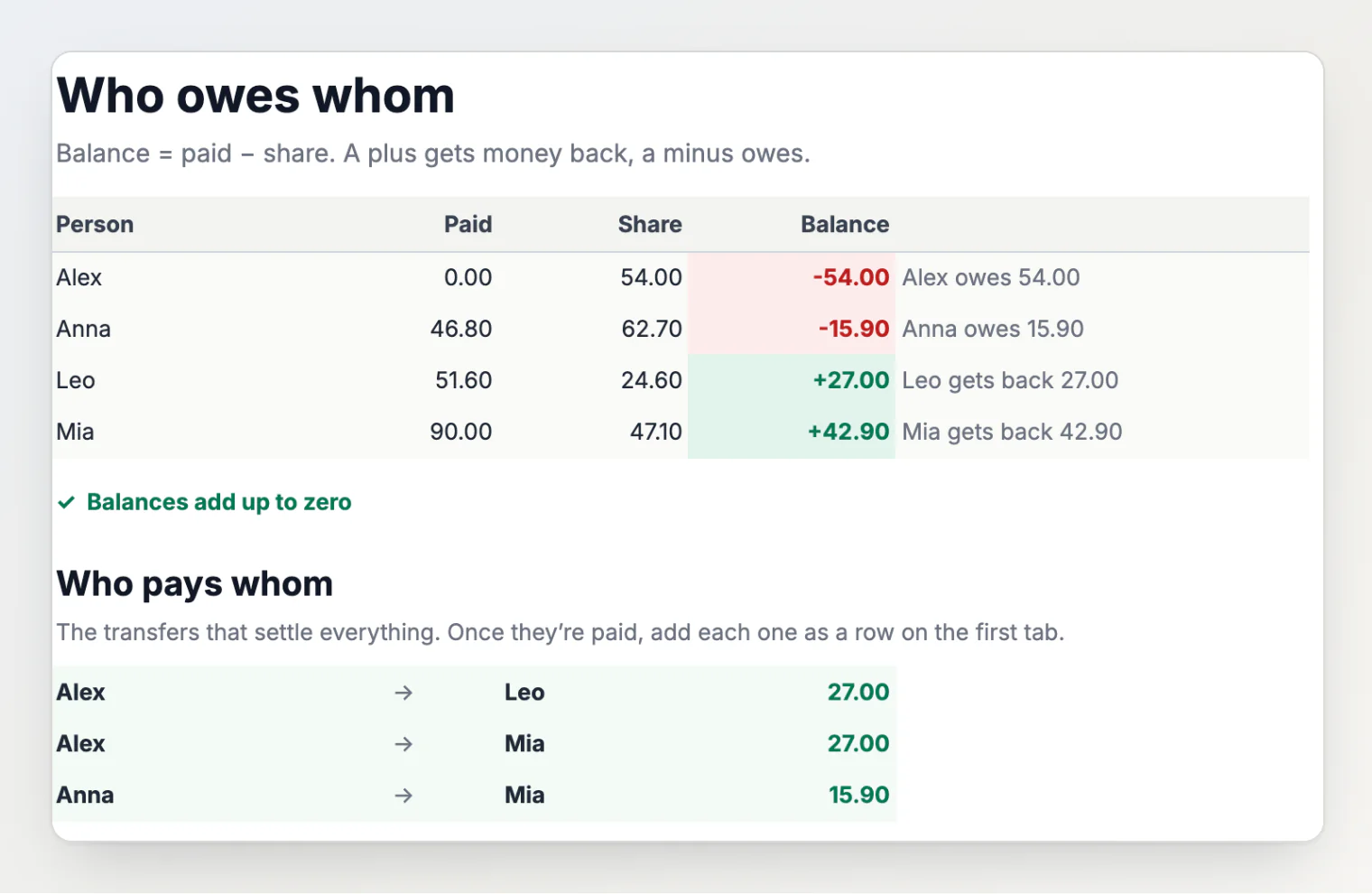
When it's time to settle, open Balances. Each person's balance is what they paid minus their share, and Who pays whom lists the transfers that settle everyone: in the example, Alex → Leo 27.00, Alex → Mia 27.00 and Anna → Mia 15.90. With n people who aren't at zero, it never lists more than n − 1.
Add each transfer as a row: the sender under Paid by, a tick under the person who got the money. When all three are in, the list says "Everyone is settled." A repayment in the middle of the month goes in the same way.
Where the sheet breaks
I'd use it for one trip or one month of a shared flat, in one currency. Five things break it.
Two currencies. A row has an amount and no currency. If one row is in euros and the next in złoty, the sheet adds them as one number, and everyone on those rows gets a wrong balance without a single error on the screen. One file per currency works. Converting everything into one currency means choosing a rate, and whoever loses on it will ask why that one.
Receipts. Custom amounts take one number per person. When dinner has a shared starter and a tip, someone works out each person's part by hand before typing it, which is the arithmetic the sheet was supposed to save.
Repayments. A repayment row keeps the balances right, but Paid and Share stop meaning what they say. After Leo pays Anna back, Leo's Paid shows 51.60, though he spent 36.00 on the group, and Anna's Share shows 62.70 instead of 47.10.
Edits. With edit access, anyone can change a row from three weeks ago. Nothing on the sheet marks the change; you find it only in the version history or in that cell's edit history. Without edit access, the others take your word for every number.
Rows typed later. Dinner is paid at the table, and the row gets typed at home days later, from memory. If it never gets typed, Mia owes 24.60 instead of getting back 42.90, and the check still says the balances add up to zero.
The same balances in HiBill
HiBill works out the same paid minus share for every transaction, but keeps the result as a balance between each pair of people, in each currency. With the same rows, Alex owes Leo €9.00 for the cinema and Mia €45.00 for the dinner, and each of them sees the same number on their side. That has a price: HiBill cancels a loop of debts but doesn't reroute a chain, so these four settle in five transfers, not the sheet's three (Debt simplification explained).
If you were Anna, the sheet's first row would be one sentence:
HiBill shows what it read: you paid €46.80, split equally three ways. Add saves it, and Leo and Mia each owe you €15.60, as in the sheet.
And the five breaks:
Two currencies: each currency keeps its own balance (Working with multiple currencies).
Receipts: each line goes to whoever had it, with tax and tip spread for you (Itemizing a bill line by line).
Repayments: a repayment is a transfer, not an expense. Settle up with … on a person's page fills one in for the whole balance in one currency; Add records it, and no money moves (Settling up and payment reminders).
Edits: a transaction's activity shows who changed it and what changed.
Rows typed later: one sentence on your phone instead of six cells and the ticks, so it's quicker to type at the table.
FAQ
Does it work for more than six people?
No. The sheet has six name columns, and a seventh would mean editing the formulas.
Does it work in Excel?
It's built for Google Sheets, and I haven't tested the Excel download (File → Download → Microsoft Excel).
Why don't my balances add up to zero?
A row is missing who paid or who took part, its custom amounts don't add up to the amount, or someone renamed a person in the green cells after their rows were typed. The Check column on the first tab says which row and what's wrong.
Continue reading
How to Calculate Who Owes Whom After Shared Expenses — the paid-minus-share formula by hand, with worked examples.
5 Ways to Keep Track of Who Owes You Money (and Which One Holds Up) — a spreadsheet next to memory, notes, the group chat and an app.
How to Split Expenses With Friends Without the Awkward Math — who's in, which split, and one running balance.