The bill arrives, somebody taps their card, and somebody else says the most expensive sentence in shared finances: "I'll add it later."
Later is a week on Thursday, when nobody remembers whether the wine was on it. The expense that never gets recorded is the one that turns into a vague sense of unfairness months afterwards — and it almost never goes missing because someone forgot. It goes missing because recording it was slower than the moment allowed.
This is a guide to closing that gap: why shared expenses go unrecorded, why the form is usually the culprit, and a faster way to log them that fits in the few seconds you actually have.
Why shared expenses go unrecorded
Look at what a typical expense form asks for: an amount, a currency, a description, a date, who paid, who shared it, and how to split it. Seven decisions, most of them with a default that is already right, spread across a screen you have to scroll.
At a restaurant table that is a lot. People are standing up, the waiter wants the card machine back, and you are the one person staring at your phone. So you put it away, and the expense joins the list of things you'll add later.
The people who keep good records are rarely more disciplined than everyone else. They just have a faster way to write things down.
The sentence is already the record
You already know how to describe the expense in one breath. If you texted it to a friend, you would write something like 45$ sushi with Max and Anna.
That line holds everything the form wanted. The amount and the currency are there. The people are there. "With" says the cost is shared with you. The date is implied — it's today. Only the description needed typing at all, and it's one word.
So the fastest expense form is no form. Let the sentence be the input, and have the app read it.
What a good sentence field has to understand
Whether you are choosing an app or building a habit, these are the parts that matter:
Amounts written the way people write them.
20$,500 lei,twenty bucks— symbols, codes, currency names and words.The names you actually use.
annashould mean your Anna, not a new person who happens to share the name — and a name the app doesn't know should be asked about, never invented.Two different prepositions. "With" means the cost is shared with you; "for" means you paid for them and none of it was yours.
30 cake with annaand30 cake for annaare different debts, and a good field knows it.Money moving, not just money spent.
gave 15 to annais a payment, not a shared cost. Paying someone back should be as quick as logging dinner.Dates in words.
yesterday,last friday,12 march. Otherwise it's today — and the app should say "today" out loud rather than assume it silently.
What it was for becomes the title.
Check the reading before you save
The risk with free text is that the app understands something slightly different from what you meant. The fix is not more fields. It is showing its reading to you before anything is saved.
In HiBill, you type the sentence in your own words — any order, any language — and press Read. AI reads it, and a review appears under the field. Type dinner 84 with max and anna yesterday and the review says You paid 84.00 EUR for dinner between 3 people, dated the day before, with "Max Keller owes you €28.00" and "Anna Lopes owes you €28.00" underneath. You see the consequence before you commit to it.
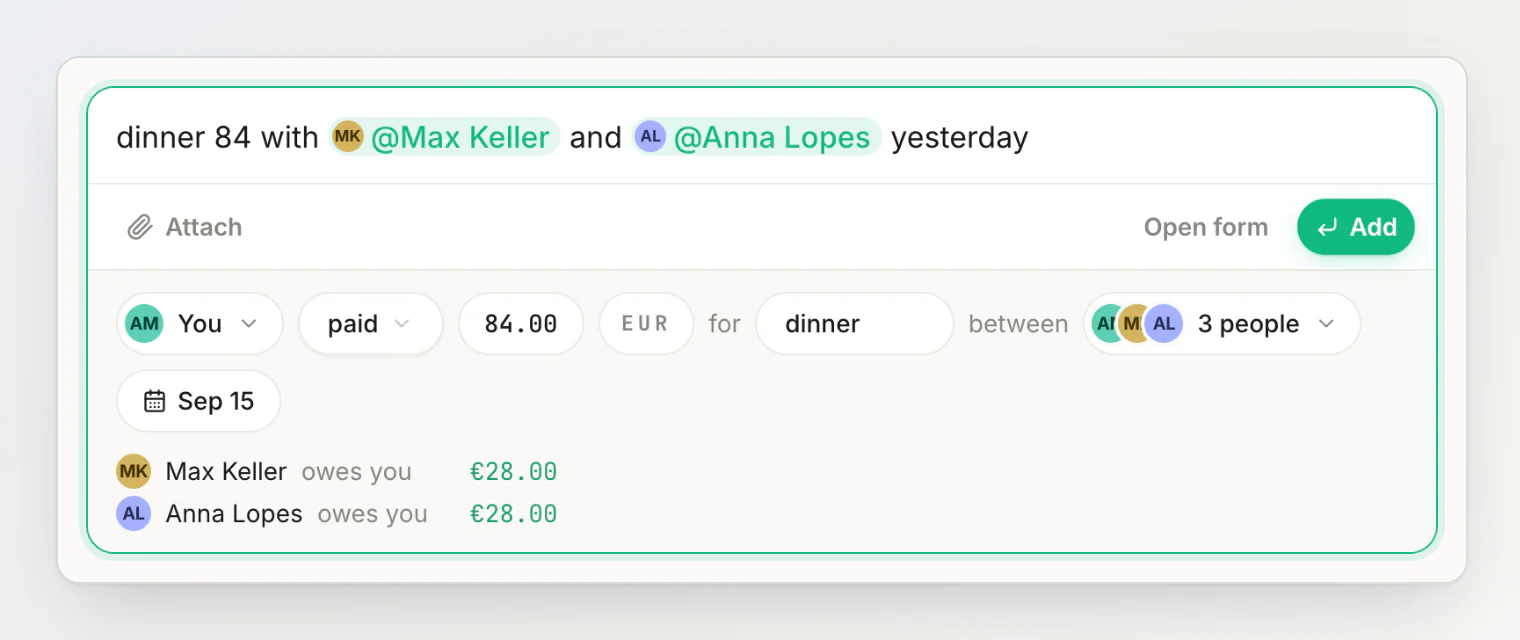
Names are matched to your contacts as you wrote them, so there is nothing to pick. If you'd rather point at someone, typing a few letters suggests the people it fits, and @ opens the whole list.
If any part of the review is wrong, tap that chip. The amount opens a calculator, the currency opens a searchable list, the people chip opens the picker, and the date chip changes the day. When it looks right, press Add — only then is anything saved, and the toast still offers Undo.
AI reads it, you have the last word
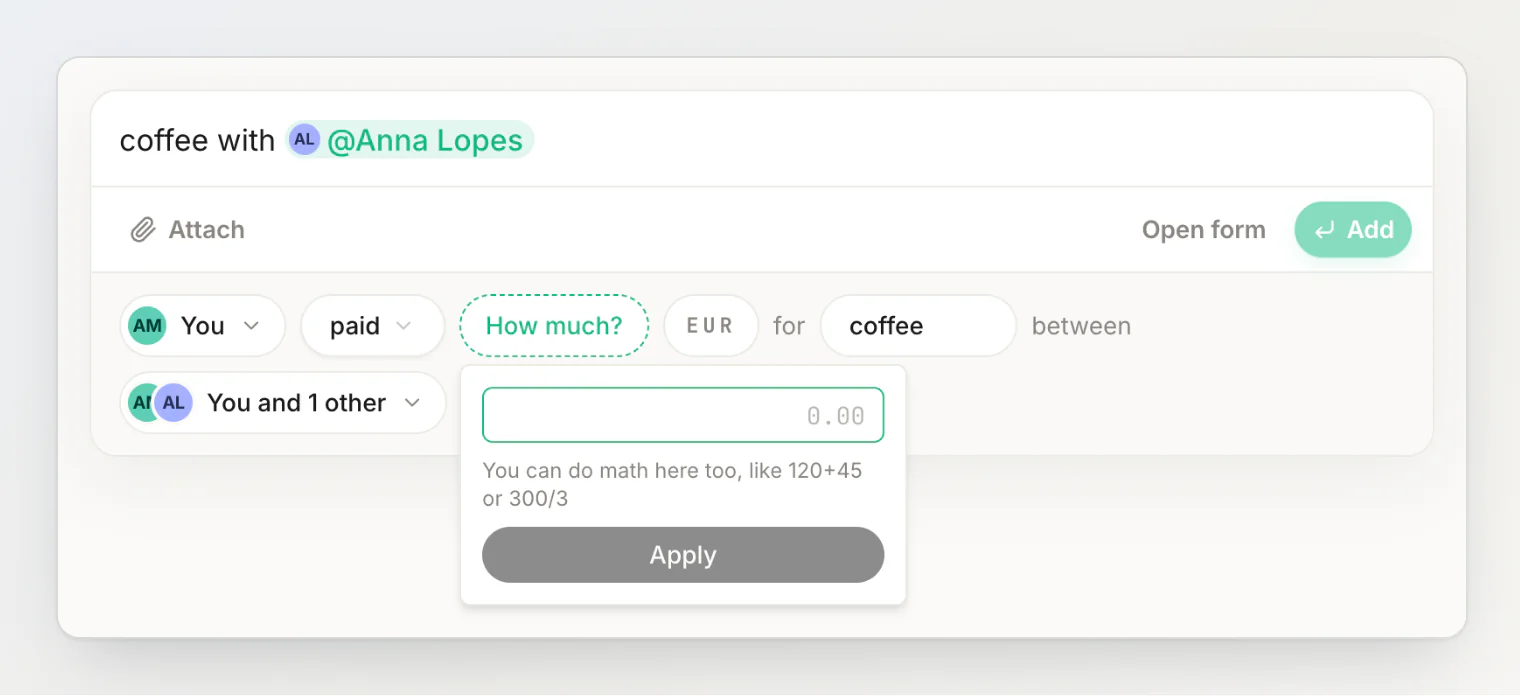
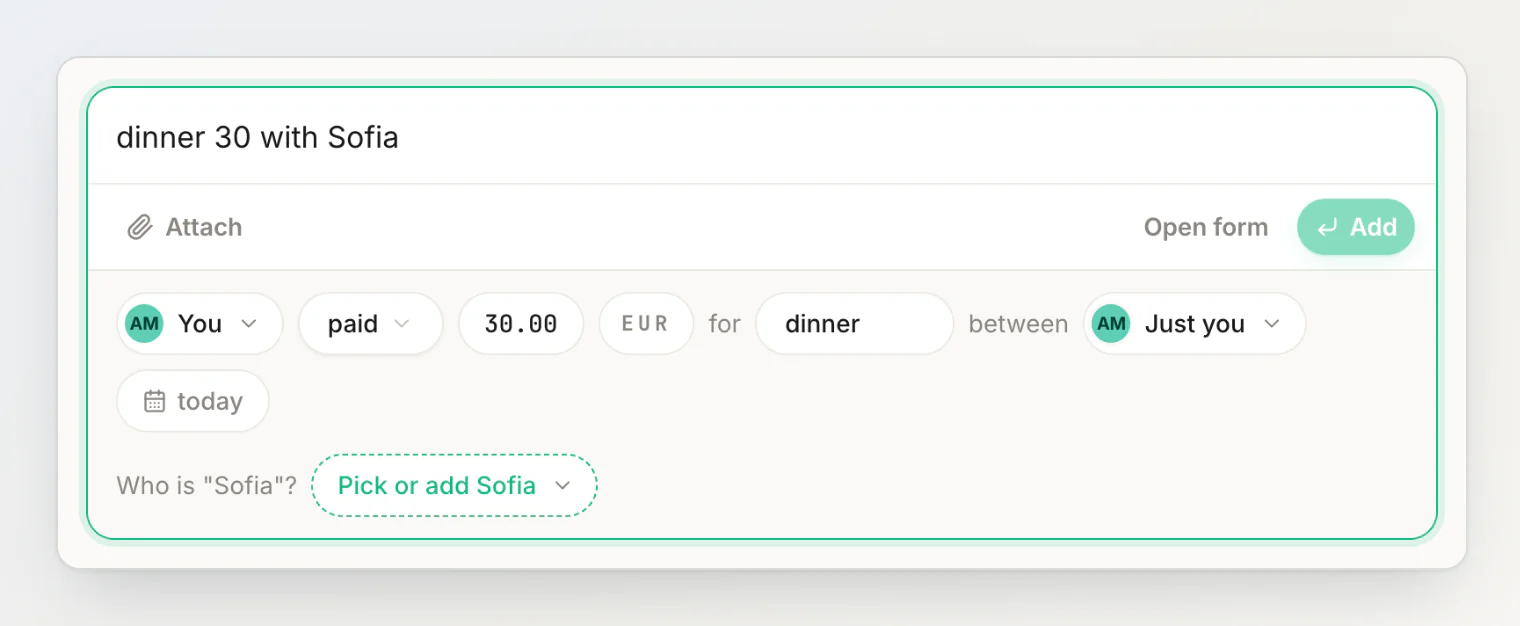
Every sentence is read by AI when you press Read — no grammar to learn, no phrasing to get right. What keeps that safe is the review, and one rule: AI never makes things up. A sentence with no amount gets a How much? chip, as above, and Add waits until you fill it in. A name that isn't one of your people gets Who is "Sofia"?, with a picker to choose the right contact or add her.
Change the sentence after a read and the review dims until you press Read it again. Each Read uses one AI sentence read from a monthly allowance — 50 a month on Free.
And the privacy question: to read a sentence, the AI is given the sentence, your date and default currency, and the names of your contacts and groups so it can match the ones you mean — not your balances or your history.
Or skip typing the amount: the receipt
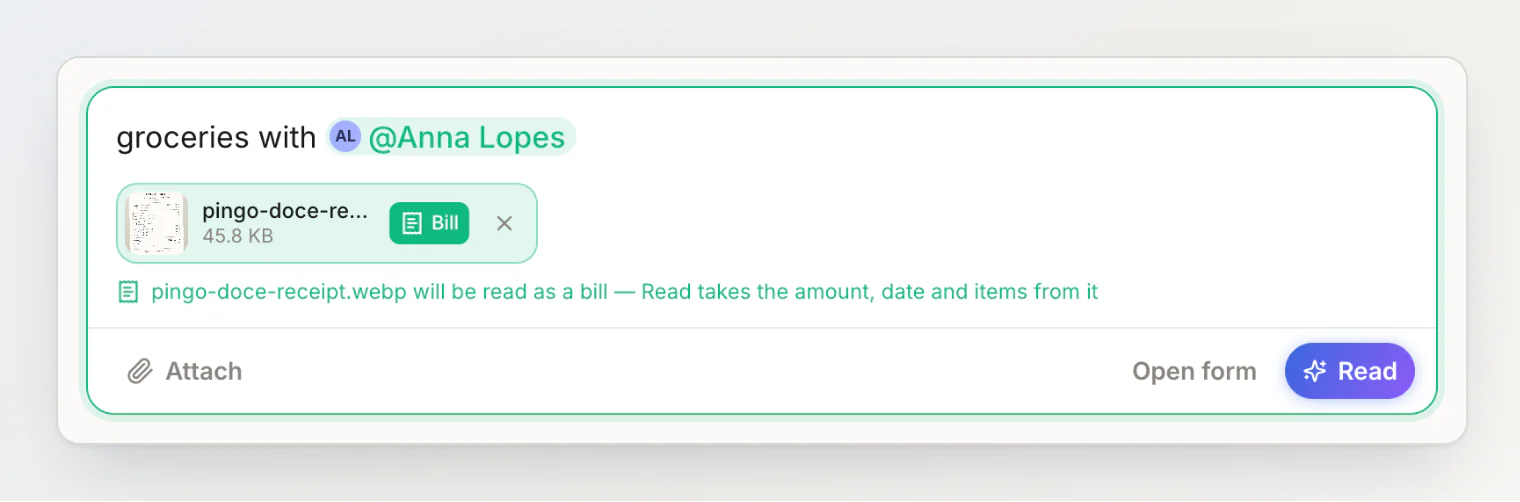
For a long restaurant bill or a supermarket run, the photo knows the numbers better than you do. Attach it with the paperclip, Attach a photo or file (or paste or drop it into the field), tap Bill on its chip, type who shared it, and press Read. The receipt gives the amount, the date and the line items; the people and the title still come from what you typed. The review shows the result, and Add saves it.
What a sentence deliberately leaves to the form
A sentence is for the everyday case: one payer, an equal split, or money handed from one person to another. It is the wrong tool for a flat's electricity bill split by room size, or a dinner where two cards paid. For those, change it in the review itself: tap the split chip for by amount, by percentage or by items, or tap who paid and pick Split between multiple payers.
That trade is the point. The common case gets fast, and the unusual case gets the room it needs, instead of every expense paying for the complexity of the rare one.
A worked example
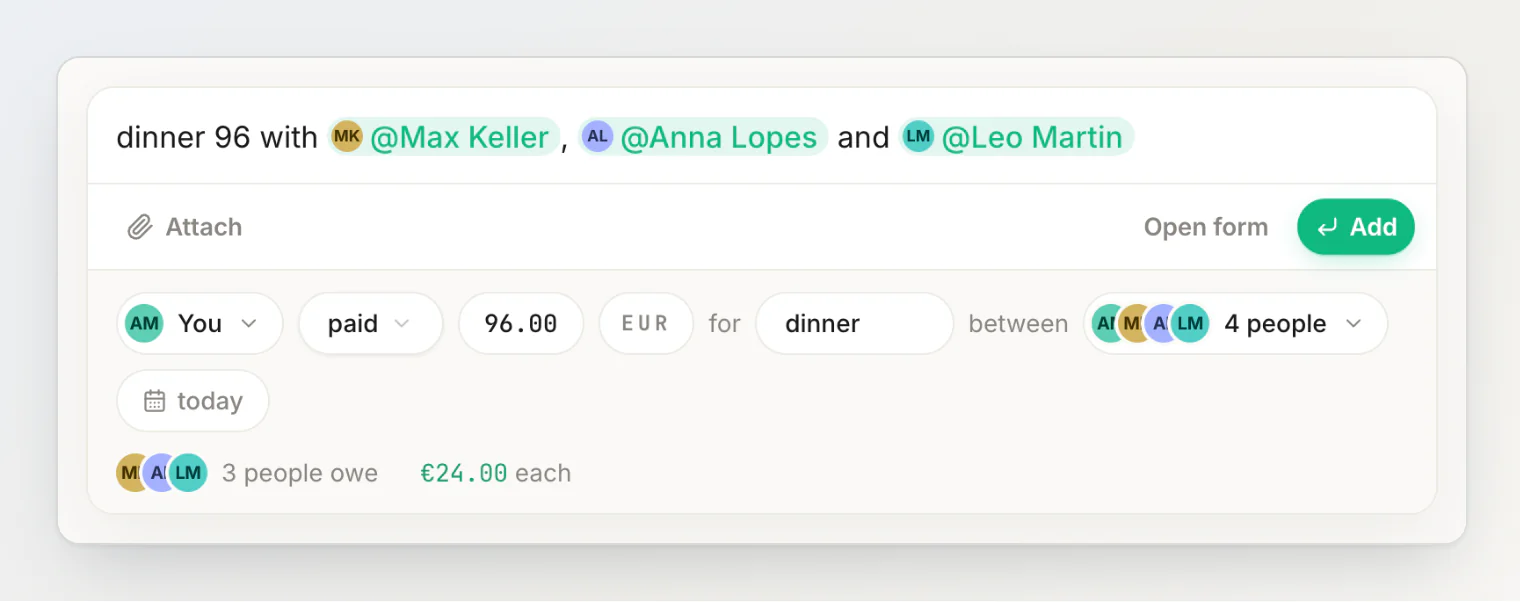
Friday, dinner for four, €96 on your card. Before anyone has stood up, you type dinner 96 with max, anna and leo and press Read.
The review says the dinner is between 4 people and "3 people owe €24.00 each". Add saves it. It takes about as long as reading this paragraph.
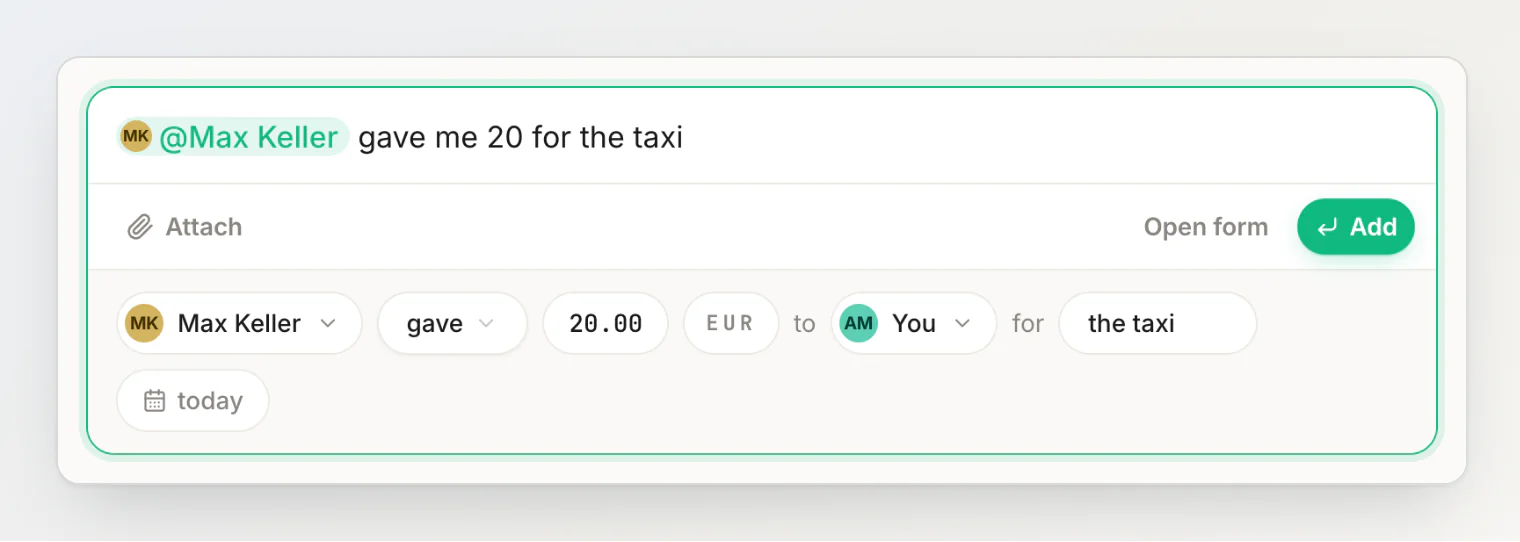
You took the taxi home, and Max hands you €20 for it. You type Max gave me 20 for the taxi, and the review reads it as money coming your way: Max Keller gave €20.00 to you. Add, and nobody had to add anything later.
Frequently asked questions
Do I have to use @ for people?
No. Names are matched to your people as you wrote them — anna finds Anna Lopes — and the review shows who was picked. Suggestions and @ are optional: they let you pick someone from the list, and a name HiBill has never seen can be added from the review.
Which languages does it understand?
Any. Write the sentence in whatever language you think in; the review shows what was read.
Does typing a sentence use AI?
Yes. Every sentence is read by AI when you press Read, and the result waits in the review until you press Add. Typing itself uses nothing — only the Read does.
Is it free?
Each Read uses one AI sentence read — 50 a month on Free and 1,000 on Pro — and a marked receipt also uses a receipt scan, plus a second read when its items are divided between people. The full form is never limited. See plans and limits.
Can I still use the full form?
Always. The review is the full form — every chip opens its editor — and Fill in the form yourself, the sliders button next to Read, opens it without AI. If you run out of reads, Open the form takes your sentence there as the title.
The habit that keeps money between friends friendly isn't discipline. It's making the record faster than the excuse.
Everything the field does, in one place: adding a transaction by typing a sentence. The AI side of it is covered in how to split expenses with AI.
Continue reading
How HiBill Works: A Quiet Ledger for the Money Between Friends — what happens after Add: people, balances, groups and settling up.
How to Split a Bill in Seconds: 20 Sentences HiBill Understands — twenty sentences to copy, and what the review shows for each.
5 Ways to Keep Track of Who Owes You Money (and Which One Holds Up) — memory, notes, spreadsheets, chats and a ledger, and where each one breaks.