Splitting a bill equally takes one tap. Splitting it fairly — you had two beers, she had the pizza, nobody touched the water — is where every expense app turns into a spreadsheet. You scan the receipt, and then you tap each line, pick a person, tap the next line, pick another person, and by the fourth row somebody has already offered to "just round it up".
HiBill now reads that out of a sentence.
Type what happened, not what the app wants
Attach the receipt, say who was there and what you had, and press Read:
dinner with Anna Lopes, I had 2 beers and the salad, Anna had the pizza, we split the wine
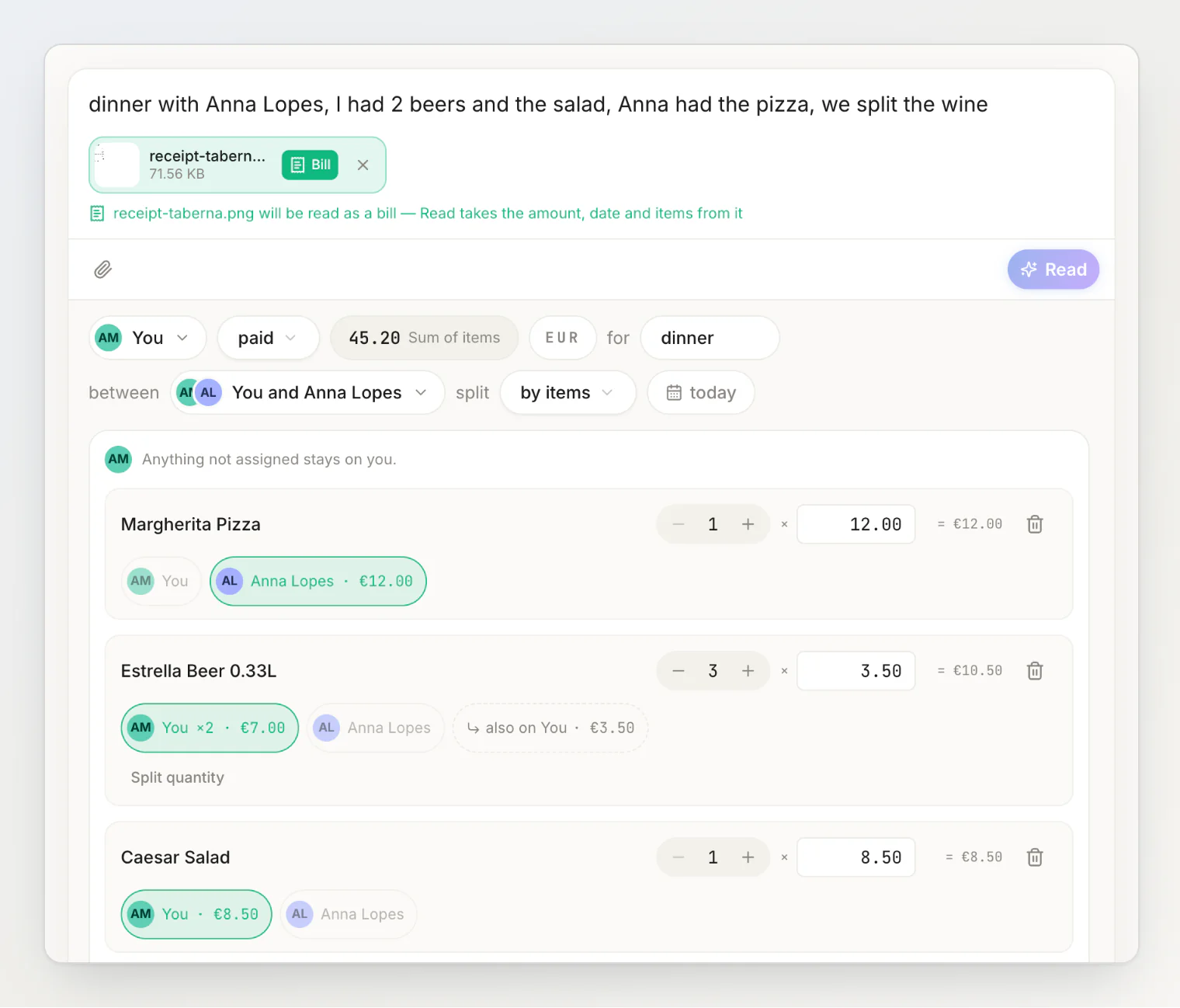
Two things happened in one press. The receipt was scanned into line items with their prices. And the sentence was read against those items, so each line landed on whoever ate it: the pizza on Anna, two of the three beers on you, the salad on you, and the wine halved.
The split switched itself to by items and the amount became the bill's own total. Nothing was saved yet — everything above is a review you can change. Tap any chip to move an item to someone else, or flip the split back to equal and the attributions clear.
The third beer
Look at the beer row: you took two of three, and the leftover one is marked also on You. That is the rule the whole feature rests on — anything nobody claims stays with the person who paid. It means an unfinished sentence is never a broken bill. Say what you remember, and the rest sits with you until somebody claims it.
The other side of the table
The same sentence works for the people who did not pay. Share the bill as a link, and whoever opens it gets a field above the items:
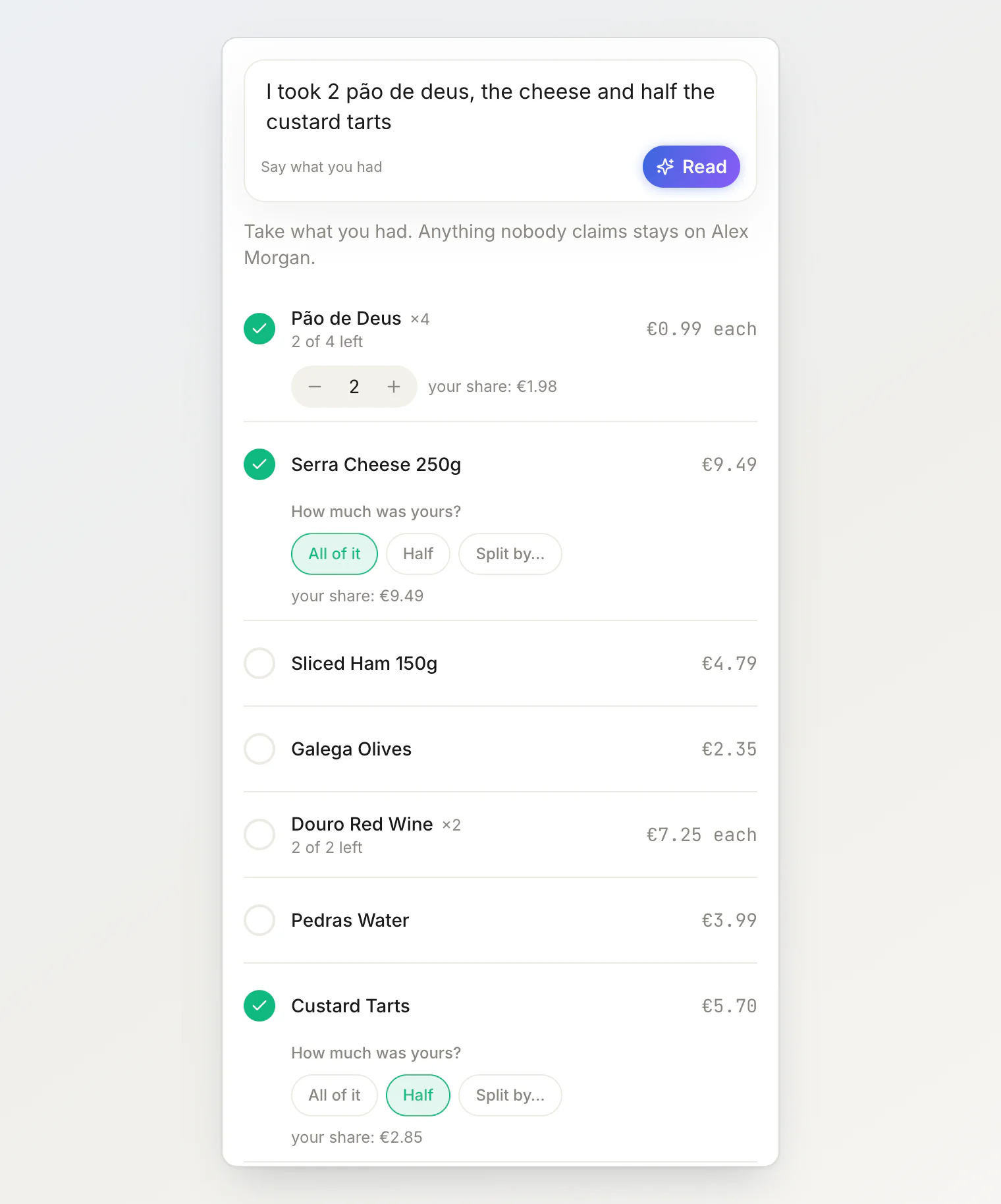
"I took 2 pão de deus, the cheese and half the custard tarts" ticks three rows in three different shapes — a count, a whole item, and a half — and leaves everything else alone. The picker fills in, and they confirm it. They are not trusting a number somebody else typed; they are looking at the same list, with their own words already applied to it.
If you already have a share and the number looks wrong, tap Change my items and say what you actually had. Your words land on top of what is already selected rather than wiping it.
What it will not do
A few things are deliberate.
It never decides money. The sentence is read into who had what, and HiBill's own engine turns that into cents — tax and tip proportional to what each person took, rounding, the payer's remainder. The model is never shown a price, so it cannot quietly invent one.
Two people can claim the same thing. If you both say you had the last beer, both claims stand and the bill shows the overlap in amber for the payer to settle. Real tables are not a database, and a split app that refuses the situation is just wrong more politely.
It only offers what you could have tapped. A third, a half, a count of two — the readings are limited to the same answers the buttons give, so anything it fills in is something you can see, change and reproduce by hand.
Where it fits
It costs one of your monthly AI reads, the same budget the sentence field already uses, and it only runs when there is something to divide — a receipt with line items, and more than one person on the bill. A solo lunch never spends it.
If you have not used the sentence field before, start with adding a transaction by typing a sentence. If you want the manual version — steppers, exact counts, shared costs — it is all still there in itemising a bill line by line. And if you would rather let everyone claim their own share, see using open splits.
The fair split was always the right one. It just used to cost more than the difference.
Continue reading
How to split a restaurant bill fairly: 7 methods that actually work — every way to divide a table's bill, and when each one is fair.
Splitting a receipt nobody wants to itemize — share the bill, let everyone claim what they had, and leave the rest with the payer.
How to Split Expenses with AI: Type What Happened, Check It, Done — the sentence field beyond receipts: what it reads, what to check, when to use the form.